|
|
 |
CSV to DBF Converter
CSV to DBF Converter allows you to convert your csv (comma-separated value) files to dbf format.
Generally, you can use any delimiter, such as TAB, semicolon etc.
Besides, you can customize the output file, say select the output codepage etc.
The program supports dBase III, dBase IV, FoxPro, VFP and dBase Level 7 formats.
Since many programs can save data in CSV format then this programs can help you
transfer these data to dBase or Foxpro files.
The program supports command line interface. So, you can run it with necessary parameters in a batch mode from the command line or from Windows scheduler without human beings.
Besides, the Site license includes a DLL which you can use from your own application.
|
Downloads
Ordering
|
| CSV to DBF Converter |
Price |
Personal license
Allows you to use the program by one person only (at work or at home or both). |
$29.95 |
Business license
Allows you to use the program by a small company on 2-10 computers. |
$99 |
Site license
Allows you to use the program in business environment and besides it includes a DLL which you can use from your own application. |
$199 |
|
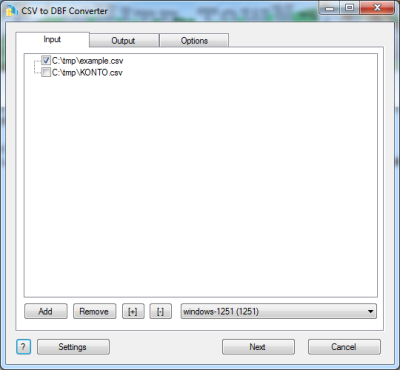
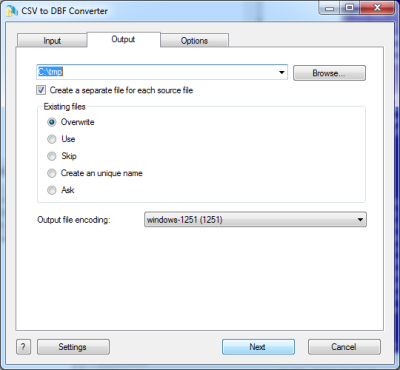
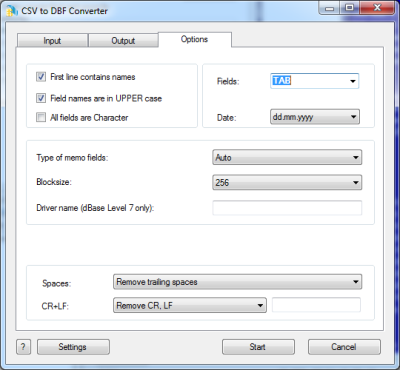
ScreenShot

CSV to DBF. Command line description
Common parameters
| /OVERWRITE=1 | Overwrite existing file. |
| /OVERWRITE=0 | Do not overwrite existing file. (Append to existing file). |
| /ASIS | Codepage as is. |
| /ANSI | Convert to ANSI codepage. |
| /OEM | Convert to OEM codepage. |
| /OPEN=1 | Open the output file after conversion. |
| /OPEN=0 | Do not open the output file after conversion. |
| /BATCH | Batch mode. The program does not ask any questions (if possible). |
| /SILENT | Batch mode. The program does not display any windows. |
| /WAIT | Do not close the program at the end. (Wait on the finish page). |
| /LOG | Create a log file in a common repository for application-specific data. A typical path is C:\Documents and Settings\username\Application Data. |
/STATUS /STATUS=filename.ext | Create a text file with a current status (Conversion In Progress, Successful, Failed, Cancelled etc). By default: %Program dir%\status.log |
| /FILTER=condition | It allows you to convert records which satisfy the condition. |
CSV specific parameters
| Drive:\Path\FileName.csv | Source CSV file |
| Drive:\Path\FileName.dbf | Target DBF file |
| Drive:\Path\ | Target DBF folder |
| /HEADER=1 | Include fields names. |
| /HEADER=0 | Do not include field names. |
| /FIELDS=? | Delimiter between fields.
Example:
/FIELDS=;
Special values:
TAB means Tab (0x09) character.
NONE means absence of any delimiter. |
| /ALLCHAR=1 | Tells the program to always read "intermixed" data columns as text. |
| /ALLCHAR=0 | Tries to detect fields types. |
/YYYYMMDD
/YYYY.MM.DD
/MM.DD.YYYY
| Use this format for date fields. |
| /FP=? | Separator in float fields.
Example:
/FP=,
By default . |
| /DD=? | Separator in date fields.
Example:
/DD=/
By default - |
|
/CHANGETYPE:FIELD=TYPE(LENGTH,WIDTH) |
Set field type in the output file
Example:
/CHANGETYPE:FIELDNAME1=N(10,2)
/CHANGETYPE:FIELDNAME2=C(128)
/CHANGETYPE:FIELDNAME3=D(8)
|
CSV to DBF Converter DLL
////////////////////// sample1.cpp ////////////////////////////
//parameters in the command line
//
//sample1.exe source.csv target.dbf ...
//
#include <windows.h>
int __declspec(dllexport) __stdcall CSVtoDBF_Converter(HWND hwnd, int argc, char *argv[]);
int
main(int argc, char *argv[])
{
return CSVtoDBF_Converter(NULL, argc, argv);
}
//
////////////////////// sample1.cpp ////////////////////////////
|
|
////////////////////// sample2.cpp ////////////////////////////
//parameters in the source code
//
//sample2.exe
//
#include <windows.h>
int __declspec(dllexport) __stdcall CSVtoDBF_Converter(HWND hwnd, int argc, char *argv[]);
int
main()
{
int n=0;
char *params[10];
params[n++]=strdup(__argv[0]);
params[n++]=strdup("source.csv");
params[n++]=strdup("target.dbf");
params[n++]=strdup("/ansi");
params[n++]=strdup("/overwrite=0");
return CSVtoDBF_Converter(NULL, n, params);
}
//
////////////////////// sample2.cpp ////////////////////////////
|
|