CSV to DBF Converter Help
CSV to DBF Converter allows you to convert your csv (comma-separated value) files to DBF format.
dBase (also stylized dBASE) was one of the first database management systems for microcomputers, and the most successful in its day.
On the 'Options' tab you can define a delimiter, such as TAB, semicolon etc.
CSV to DBF Converter allows you to transfer your CSV files to dBase III, dBase IV, FoxPro, VFP and dBase Level 7 formats quickly and easily.
DBF files usually use single-byte encoding. Do not select Unicode, it will not work.
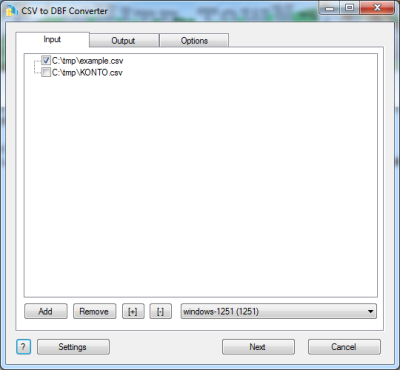
The first tab allows you to select source files. You can select for conversion one or several files.
Double-click on a file displays a Preview window.
If your files contain non-latin characters then you have to choose a correct charset.
Command line parameter:
-incharset=windows-1251
-incharset=65001 (UTF-8)
In the command line you have to use an exact phrase or a code page.
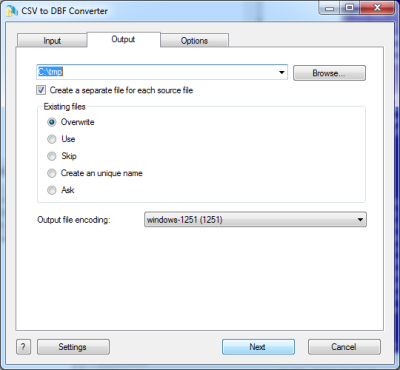
The second tab allows you to select the output folder or file.
If you selected a folder or checked the option
[x] Create a separate file for each source file
then every source file(table) will be converted to a separate output file.
i.e.
| filename.csv | >> | filename.dbf |
| another.csv | >> | another.dbf |
If you selected a file then a content of all source files will be converted to this file.
Command line parameters are:
| -output=c:\target\tmp\ |
| -separate=1, -separate=0 |
Besides, you can define the program's behaviour what is necessary to do when an output file already exists.
Command line parameters are:
| -files=overwrite | Overwrite existing files |
| -files=use | Use existing files (append to the end) |
| -files=skip | Skip (do not convert a source file) |
| -files=unique | Create an unique name. example.dbf, example.1.dbf, example.2.dbf, ... |
| -files=ask | Ask for action for each file |
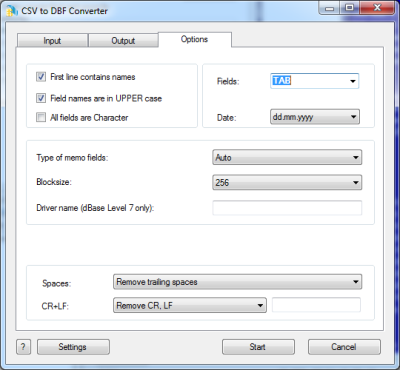
The last tab allows you to customize the output file.
| Option |
Description |
Command line |
| [x] First line contains field names |
Check it if your file contains names of columns |
-fieldnames=1
-fieldnames=0 |
| [x] Field names are in UPPER case |
Convert source columns names to upper case |
-upper=1
-upper=0 |
| [x] All fields are Character |
Check it if your wish to convert all information as Character fields regardless of content |
-allchar=1
-allchar=0 |
| Fields delimiter |
Select a predefined character or enter your own
PIPE means |, TAB means 0x09 |
-fields=PIPE
-fields=; |
| Date format |
Just select what is suitable for you.
the last format (yyyymmdd) does not contain delimiters |
-date=mm-dd-yyyy
-date=dd.mm.yyyy |
| Type of file |
Select type of memo fields. |
-type=dbase3
-type=dbase4
-type=foxpro
-type=vfp
-type=dbase7 |
| Block size |
You can select the necessary block size for memo fields. |
-blocksize=512 |
| Driver name string |
In some cases you need to specify the driver name for dBase Leverl 7 files |
-driver=SomeName
|
| What to do with CR and LF symbols |
You can keep these symbols, remove them or replace to a custom string |
-removecrlf=0 (keep)
-removecrlf=1 (remove)
-crlf=# (replace)
|
| Spaces in Character fields |
You can remove trailing spaces, keep all spaces or remove both leading and trailing |
-spaces=trailing
-spaces=keep
-spaces=both |
| Command line only |
This parameter allows you to change a type of fields. You can specify several such parameters in the command line. The common syntax is:
-ct=NAME=TYPE(LENGTH) |
-ct=FIELD1=C(25)
-ct=FIELD2=N(10.2)
-ct=FIELD3=M
-ct=FIELD4=D |
| Command line only |
This parameter is similar to the previous one, but allows you to set a few types in one parameter
This parameter is low-priority.
Set custom column types in the output file
-coltypes=N(10);C(20);D;M;L;N(5.2);... |
-coltypes=C(20);D;;;L;N(5.2) |
Besides there are some special command line parameters:
| -log=c:\tmp\filename.log | create a .log file with debug messages |
| -batch | run the conversion without prompt and display main window |
| -silent | run the conversion without prompt and do not display main window |
| -key=your_key | it allows to pass the registration key to the program and do not store it in program's settings |
| @c:\path\params.txt | read command line parameters from file. One parameter per line. |
If the converter does not have enough parameters or some error occurs then
the batch process will be interrupted and the converter displays main window to resolve the problem.
After successful conversion you will see a list of output files.
Double-click on a file runs an associated program.
Right-mouse-click displays a Preview window.
|