WhiteTown Software, the official website.
Site map Home News Download Order Contacts Service   RU

CDBF for Windows
CDBF for Windows (console)
CDBF for DOS
CDBF for Linux
CDBFlite
CDBFapi
DBF Script
CDBFinfo
CDBFShell
CDBFview

Online Database Converter
New!

Database Converters
DBF to CSV
DBF to MDB (Access)
DBF to XLS (Excel)
DBF to HTML
DBF to SQL
DBF to XML
DBF to PDB (Palm DataBase)
DBF to DBF
MDB (Access) to DBF
XLS (Excel) to DBF
CSV to DBF
PDB (Palm DataBase) to DBF
DBF Converters' Shell

DBF to CSV Converter


Get it from CNET Download.com!

 
Video presentation New!
DBF to CSV Converter allows you to convert your dbf files to csv (comma-separated value) format.

Generally, you can use any delimiter, such as TAB, semicolon etc.
Besides, you can optionally conclude character fields in quotes, remove trailing spaces and select the output codepage. The program supports dBase III, dBase IV, FoxPro, VFP and dBase Level 7 formats.

Since many programs understand CSV format then this programs can help you transfer your data to another system.

The program supports command line interface. So, you can run it with necessary parameters in a batch mode from the command line or from Windows scheduler without human beings.
Besides, the Site license includes a DLL which you can use from your own application.

Downloads
ZIP File Description Version Size
dbf2csv.zip DBF to CSV Converter 2.20 1100Kb

Ordering
DBF to CSV Converter Price
Personal license
Allows you to use the program by one person only (at work or at home or both).
$29.95
Business license
Allows you to use the program by a small company on 2-10 computers.
$99
Site license
Allows you to use the program in business environment and besides it includes a DLL which you can use from your own application.
$199

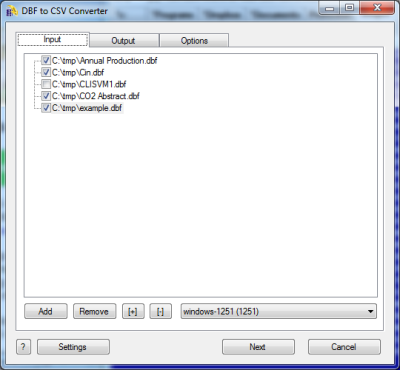
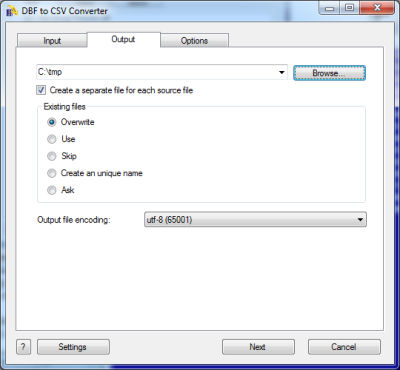
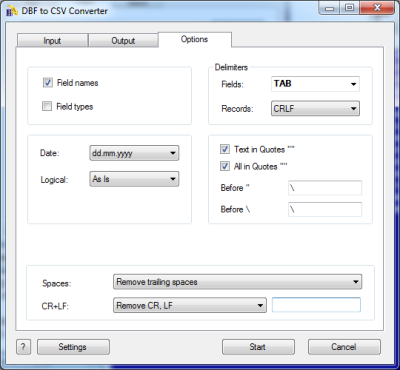
ScreenShot

DBF to CSV Wizard

DBF to CSV. Command line description

Common parameters

/OVERWRITE=1Overwrite existing file.
/OVERWRITE=0Do not overwrite existing file. (Append to existing file).
/SKIPDEL=1Skip records marked as deleted.
/SKIPDEL=0Do not skip records marked as deleted.
/ASISCodepage as is.
/ANSIConvert to ANSI codepage.
/OEMConvert to OEM codepage.
/OPEN=1Open the output file after conversion.
/OPEN=0Do not open the output file after conversion.
/BATCHBatch mode. The program does not ask any questions (if possible).
/SILENTBatch mode. The program does not display any windows.
/WAITDo not close the program at the end. (Wait on the finish page).
/LOGCreate a log file in a common repository for application-specific data.
A typical path is C:\Documents and Settings\username\Application Data.
/STATUS
/STATUS=filename.ext
Create a text file with a current status (Conversion In Progress, Successful, Failed, Cancelled etc).
By default: %Program dir%\status.log
/FILTER=conditionIt allows you to convert records which satisfy the condition.

CSV specific parameters

Drive:\Path\FileName.dbfSource DBF file
Drive:\Path\FileName.csvTarget CSV file
/REMTRAIL=1Remove trailing spaces in Character and Memo fields.
/REMTRAIL=0Do not remove trailing spaces in Character and Memo fields.
/REMCRLF=1Remove CR+LF in Memo fields.
/REMCRLF=0Do not remove CR+LF in Memo fields.
/ESCAPE=?????Escape character before a single or a double quote.
Examples:
/ESCAPE=#
"/ESCAPE=""
/QUOTES=1Conclude character and memo fields in double quotes.
/QUOTES=0Do not conclude character and memo fields in double quotes.
/FIELDS=?Delimiter between fields.
Example:
/FIELDS=;

Special values:
TAB means Tab (0x09) character.
NONE means absence of any delimiter.

/RECORDS=?Delimiter between records.
Example:
/FIELDS=CRLF

Special values:
CRLF means 0x0d 0x0a.
CR means 0x0d.
LF means 0x0a.
NONE means absence of any delimiter.

/HEADER=1Include fields names.
/HEADER=0Do not include field names.
/YYYYMMDD
/YYYY.MM.DD
/MM.DD.YYYY
/MM-DD-YYYY
/DD.MM.YYYY
/DD-MM-YYYY
/YYYY-MM-DD
Use this format for date fields.
/STRIPYEAR=1Remove two leading digits in year for Date fields. i.e. 2006 -> 06
/STRIPYEAR=0Display Date fields in default format

DBF to CSV Converter DLL

////////////////////// sample1.cpp ////////////////////////////
//parameters in the command line
//
//sample1.exe source.dbf target.csv ...
//

#include <windows.h>

int __declspec(dllexport)	__stdcall	DBFtoCSV_Converter(HWND hwnd, int argc, char *argv[]);


int
main(int argc, char *argv[])
{
	return DBFtoCSV_Converter(NULL, argc, argv);
}

//
////////////////////// sample1.cpp ////////////////////////////


////////////////////// sample2.cpp ////////////////////////////
//parameters in the source code
//
//sample2.exe
//

#include <windows.h>

int __declspec(dllexport)	__stdcall	DBFtoCSV_Converter(HWND hwnd, int argc, char *argv[]);

int
main()
{
	int     n=0;
	char    *params[10];

	params[n++]=strdup(__argv[0]);
	params[n++]=strdup("source.dbf");
	params[n++]=strdup("target.csv");
	params[n++]=strdup("/ansi");
	params[n++]=strdup("/overwrite=0");

	return DBFtoCSV_Converter(NULL, n, params);
}

//
////////////////////// sample2.cpp ////////////////////////////

0.000417947769165 | Privacy policy | Copyright © 1996-2010, WhiteTown Software