Site map Home News Download Order Contacts Service  

Home
News
Download
Order
Contacts
Service

CDBF for Windows
CDBF for Windows (console)
CDBF for DOS
CDBF for Linux
CDBFlite
CDBFapi
CDBFinfo
CDBFShell
CDBFview

WhiteTown Wizards
DBF to CSV
DBF to MDB (Access)
DBF to XLS (Excel)
DBF to HTML
DBF to SQL
DBF to XML
DBF to PDB (Palm DataBase)
DBF to DBF
MDB (Access) to DBF
XLS (Excel) to DBF
PDB (Palm DataBase) to DBF

Subscribe to our mailing list:

Reseller oportunities
Affiliates
Publications

Other stuff

Google

WhiteTown.com
WWW
DBF to HTML Converter

DBF to HTML Converter allows you to convert your dbf files to HTML pages.

It allows you to create a single page or many pages with a navigation bar.
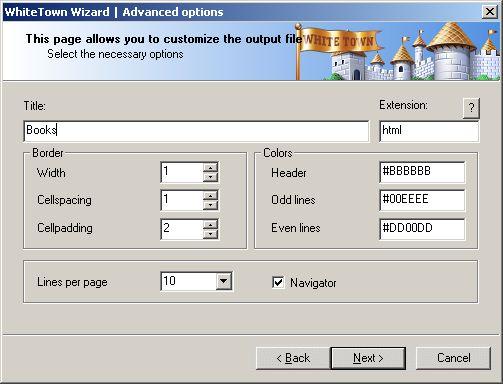
Besides, you can define such parameters as border width, cellspacing or cellpadding.
The program supports dBase III, dBase IV, FoxPro, VFP and dBase Level 7 formats.

The program supports command line interface.

Downloads
ZIP File Description Version Size
dbf2htm.zip DBF to HTML Converter 1.51 380Kb

Ordering
DBF to HTML Converter Price
Personal license
Allows you to use the program by one person only (at work or at home or both).
$29.95
Business license
Allows you to use the program in business environment.
$99

ScreenShot

DBF to HTML Wizard

DBF to HTML. Command line description

Common parameters

/OVERWRITE=1Overwrite existing file.
/OVERWRITE=0Do not overwrite existing file. (Append to existing file).
/ASISCodepage as is.
/ANSIConvert to ANSI codepage.
/OEMConvert to OEM codepage.
/OPEN=1Open the output file after conversion.
/OPEN=0Do not open the output file after conversion.
/BATCHBatch mode. Do not ask any questions (if possible).
/WAITDo not close the program at the end. (Wait on the finish page).
/LOGCreate a log file in a common repository for application-specific data.
A typical path is C:\Documents and Settings\username\Application Data.

HTML specific parameters

Drive:\Path\FileName.dbfSource DBF file
Drive:\Path\Target directory.
/STRUCTURE=1Export structure of the table.
/STRUCTURE=0Do not export structure of the table.
/INFORMATION=1Export information from the table.
/INFORMATION=0Do not export information from the table.
/REMTRAIL=1Remove trailing spaces in Character and Memo fields.
/REMTRAIL=0Do not remove trailing spaces in Character and Memo fields.
/REMCRLF=1Remove CR+LF in Memo fields.
/REMCRLF=0Do not remove CR+LF in Memo fields.
/TITLE=?????Page title.
Example:
/TITLE="Our clients"
/EXTENSION=???Extension of the output files.
Examples:
/EXTENSION=html
/EXTENSION=php
/WIDTH=???Border width.
Example:
/WIDTH=10
/CELLSPACING=???Cellspacing in the table.
Example:
/CELLSPACING=10
/CELLPADDING=???Cellpadding in the table.
Example:
/CELLPADDING=10
/HEADER=?????Color of the table header.
Example:
/HEADER=red
/ODDLINES=?????Color of the odd lines.
Example:
/ODDLINES=green
/EVENLINES=?????Color of the even lines.
Example:
/EVENLINES=cyan
/NAVIGATOR=1Print navigation bar (if lines > 0).
/NAVIGATOR=0Do not print navigation bar.
/LINES=?????Lines per page.
Examples:
/LINES=20
/LINES=0

0.00294804573059 , | Privacy policy | Copyright © 1996-2008, WhiteTown Software