WhiteTown Software, the official website.
Site map Home News Download Order Contacts Service   RU

CDBF for Windows
CDBF for Windows (console)
CDBF for DOS
CDBF for Linux
CDBFlite
CDBFapi
DBF Script
CDBFinfo
CDBFShell
CDBFview

Online Database Converter
New!

Database Converters
DBF to CSV
DBF to MDB (Access)
DBF to XLS (Excel)
DBF to HTML
DBF to SQL
DBF to XML
DBF to PDB (Palm DataBase)
DBF to DBF
MDB (Access) to DBF
XLS (Excel) to DBF
CSV to DBF
PDB (Palm DataBase) to DBF
DBF Converters' Shell

DBF to SQL Converter

 
See also:
DBF to CSV Converter
Try also DBF to CSV (Comma-separated values) Converter.
Download now! 

DBF to SQL Converter allows you to convert your dbf files to SQL script.

You can apply this script on any SQL server, so you can easily transfer your data to a new system.
There are several different SQL servers, but this program allows you to customize the output file. Currently it support MS SQL, MySql, PostgreSQL, etc.
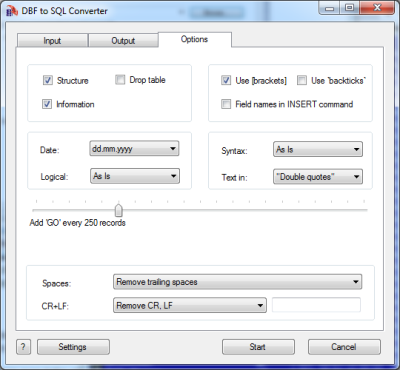
You can also select various options, like type of quotes (single or double), using square brackets around field names, an action with carrier return and line feed symbols. The program supports dBase III, dBase IV, FoxPro, VFP and dBase Level 7 formats.

The program supports command line interface. So, you can run it with necessary parameters in a batch mode from the command line or from Windows scheduler without human beings.
Besides, the Site license includes a DLL which you can use from your own application.

Downloads
ZIP File Description Version Size
dbf2sql.zip DBF to SQL Converter 2.20 1100Kb

Ordering
DBF to SQL Converter Price
Personal license
Allows you to use the program by one person only (at work or at home or both).
$29.95
Business license
Allows you to use the program in business environment.
$99
Site license
Allows you to use the program in business environment and besides it includes a DLL which you can use from your own application.
$199

ScreenShot

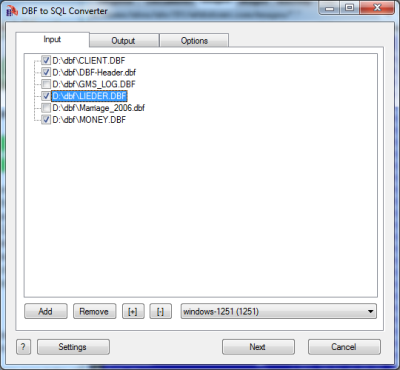
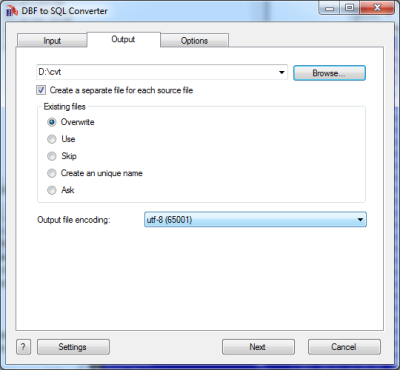
DBF to SQL Wizard

DBF to SQL. Command line description

Common parameters

/OVERWRITE=1Overwrite existing file.
/OVERWRITE=0Do not overwrite existing file. (Append to existing file).
/ASISCodepage as is.
/ANSIConvert to ANSI codepage.
/OEMConvert to OEM codepage.
/OPEN=1Open the output file after conversion.
/OPEN=0Do not open the output file after conversion.
/BATCHBatch mode. Do not ask any questions (if possible).
/WAITDo not close the program at the end. (Wait on the finish page).
/LOGCreate a log file in a common repository for application-specific data.
A typical path is C:\Documents and Settings\username\Application Data.

SQL specific parameters

Drive:\Path\FileName.dbfSource DBF file
Drive:\Path\FileName.sql
Drive:\Path\
Target SQL file
Targer folder
/REMTRAIL=1Remove trailing spaces in Character and Memo fields.
/REMTRAIL=0Do not remove trailing spaces in Character and Memo fields.
/REMCRLF=1Remove CR+LF in Memo fields.
/REMCRLF=0Do not remove CR+LF in Memo fields.
/REMCRLF=2Replace CR+LF to \r\n
/DOUBLEConclude character fields in double quotes.
/SINGLEConclude character fields in single quotes.
/FIELDNAMES=1Use field names in the INSERT command.
/FIELDNAMES=0Do not use field names in the INSERT command.
/SQL2000=0Do not use SQL 2000 syntax in CREATE TABLE command.
/SQL2000=1Use SQL 2000 syntax in CREATE TABLE command.
/SQL2000=2Use MySQL syntax in CREATE TABLE command.
/SQL2000=3Use PostgreSQL syntax in CREATE TABLE command.
/ADDGO=valueAdd the command GO between commands INSERT
If value is equal to zero then GO is not used.
/YYYYMMDD
/YYYY.MM.DD
/MM.DD.YYYY
/MM-DD-YYYY
/DD.MM.YYYY
/DD-MM-YYYY
/YYYY-MM-DD
/MM/DD/YYYY
/DD/MM/YYYY
/YYYY/MM/DD
Use this format for date fields.
/LOGICAL=0Use 1 and 0 in logical fields
/LOGICAL=1Use TRUE and FALSE in logical fields
/BRACKETS=0Do not enclose fields names in square brackets.
/BRACKETS=1Enclose fields names in square brackets.
/ESCAPE=?????Escape character before a single or a double quote.
Examples:
/ESCAPE=#
"/ESCAPE=""

DBF to SQL Converter DLL

////////////////////// sample1.cpp ////////////////////////////
//parameters in the command line
//
//sample1.exe source.dbf target.sql ...
//

#include <windows.h>

int __declspec(dllexport)	__stdcall	DBFtoSQL_Converter(HWND hwnd, int argc, char *argv[]);


int
main(int argc, char *argv[])
{
	return DBFtoSQL_Converter(NULL, argc, argv);
}

//
////////////////////// sample1.cpp ////////////////////////////


////////////////////// sample2.cpp ////////////////////////////
//parameters in the source code
//
//sample2.exe
//

#include <windows.h>

int __declspec(dllexport)	__stdcall	DBFtoSQL_Converter(HWND hwnd, int argc, char *argv[]);

int
main()
{
	int     n=0;
	char    *params[10];

	params[n++]=strdup(__argv[0]);
	params[n++]=strdup("source.dbf");
	params[n++]=strdup("target.sql");
	params[n++]=strdup("/ansi");
	params[n++]=strdup("/overwrite=0");

	return DBFtoSQL_Converter(NULL, n, params);
}

//
////////////////////// sample2.cpp ////////////////////////////

0.000401020050049 | Privacy policy | Copyright © 1996-2010, WhiteTown Software