MDB to XLS Converter Help
MDB to XLS Converter allows you to convert your Access files to XLS format.
Microsoft Access is a database application developed by Microsoft for Microsoft Windows..
MDB (Access) to XLS Converter allows you to convert your MDB or ACCDB (Microsoft Access) files to XLS format.
MS Access up until 2007 version used MDB files as its primary format. Access 2007 uses ACCDB as its primary file format.
You can select tables for export and set necessary options. The program can read both old MDB file and ACCDB 2007 files and convert then to dBase III, dBase IV, FoxPro, VFP and dBase Level 7 formats.
Besides, you can optionally remove trailing spaces and select the output codepage.
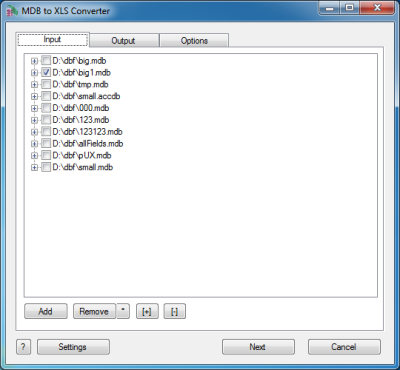
The first tab allows you to select source files. You can select for conversion one or several files.
If the name of a file is expanded then you can select tables(sheets) for conversion.
If no tables are selected then all tables will be converted.
If you selected certain tables then only these tables will be converted.
Double-click on a file displays a Preview window.
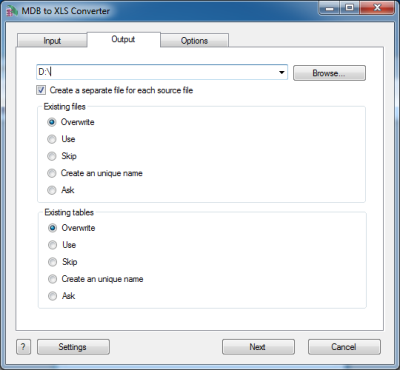
The second tab allows you to select the output folder or file.
If you selected a folder or checked the option
[x] Create a separate file for each source file
then every source file(table) will be converted to a separate output file.
i.e.
filename.mdb
table1
table2 | >> |
table1.xls
table2.xls |
another.accdb
tableA
tableB | >> |
tableA.xls
tableB.xls |
If you selected a file then a content of all source files will be converted to this file.
Command line parameters are:
| -output=c:\target\tmp\ |
| -separate=1, -separate=0 |
Besides, you can define the program's behaviour what is necessary to do when an output file already exists.
Command line parameters are:
| -files=overwrite | Overwrite existing files |
| -files=use | Use existing files (append to the end) |
| -files=skip | Skip (do not convert a source file) |
| -files=unique | Create an unique name. example.xls, example.1.xls, example.2.xls, ... |
| -files=ask | Ask for action for each file |
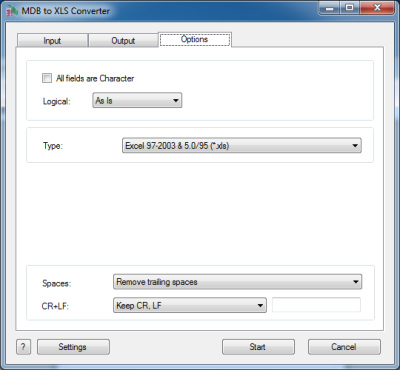
The last tab allows you to customize the output file.
| Option |
Description |
Command line |
| In GUI mode select tables |
If you want to convert only certain tables from the command line, you can specify each of them with this parameter. In this example you will convert only sheet1 and sheet5 (if they are in a file). |
-table=sheet1
-table=sheet5 |
| [x] All fields are Character |
Check it if your wish to convert all information as Character fields regardless of content |
-allchar=1
-allchar=0 |
| Style of Logical fields |
This parameter allows you to override values from Logical fields to your own values.
Predefined:
-logical=AsIs
-logical=1,0
-logical=True,False
-logical=Yes,No
|
User-defined example:
-logical=On,Off
|
| Type of file |
You can select between Excel 97-2003 & 5.0/95 (*.xls) and Excel 2007 and later (*.xlsx) formats. |
-type=xls
-type=xlsx |
| What to do with CR and LF symbols |
You can keep these symbols, remove them or replace to a custom string |
-removecrlf=0 (keep)
-removecrlf=1 (remove)
-crlf=# (replace)
|
| Spaces in Character fields |
You can remove trailing spaces, keep all spaces or remove both leading and trailing |
-spaces=trailing
-spaces=keep
-spaces=both |
Besides there are some special command line parameters:
| -log=c:\tmp\filename.log | create a .log file with debug messages |
| -batch | run the conversion without prompt and display main window |
| -silent | run the conversion without prompt and do not display main window |
| -key=your_key | it allows to pass the registration key to the program and do not store it in program's settings |
| @c:\path\params.txt | read command line parameters from file. One parameter per line. |
If the converter does not have enough parameters or some error occurs then
the batch process will be interrupted and the converter displays main window to resolve the problem.
After successful conversion you will see a list of output files.
Double-click on a file runs an associated program.
Right-mouse-click displays a Preview window.
|