|
|
 |
XLS (Excel) to DBF Converter
XLS (Excel) to DBF Converter allows you to convert your XLS (Microsoft Excel) files to DBF format.
MS Excel up until 2007 version used a proprietary binary file format called Binary Interchange File Format (BIFF) as its primary format. Excel 2007 uses Office Open XML as its primary file format.
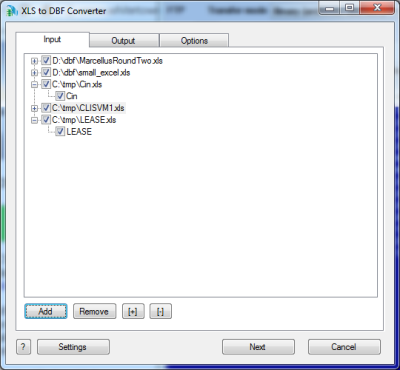
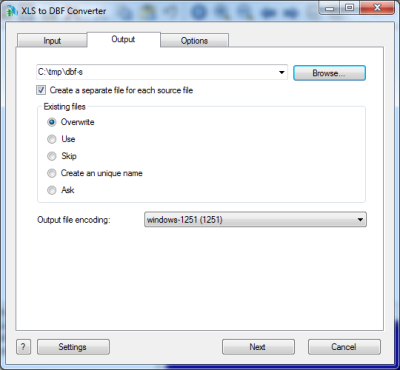
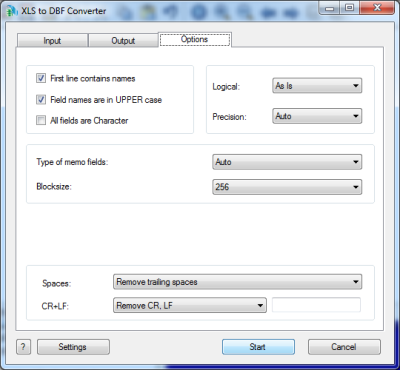
You can select tables for export and set necessary options.
The program can read both old XLS file and Excel 2007 files and convert then to dBase III, dBase IV, FoxPro, VFP and dBase Level 7 formats.
There are two executable files: XLS2DBF.EXE and XLS2DBF2007.EXE
The first application XLS2DBF.EXE supports XLS files only. It does not support Excel 2007 format.
The second application XLS2DBF2007.EXE supports both XLS and XLSX, XLSB files, but it will work only if you have MS Excel 2007 on your computer.
2007 Office System Driver. This download will install a set of components that can be used by non-Microsoft Office applications to read data from 2007 Microsoft Office system files.
The program supports command line interface. So, you can run it with necessary parameters in a batch mode from the command line or from Windows scheduler without human beings.
Besides, the Site license includes a DLL which you can use from your own application.
|
Downloads
Ordering
|
| XLS (Excel) to DBF Converter |
Price |
Personal license
Allows you to use the program by one person only (at work or at home or both). |
$29.95 |
Business license
Allows you to use the program by a small company on 2-10 computers. |
$99 |
Site license
Allows you to use the program in business environment and besides it includes a DLL which you can use from your own application. |
$199 |
|
ScreenShot

XLS (Excel) to DBF. Command line description
Common parameters
| /OVERWRITE=1 | Overwrite existing file. |
| /OVERWRITE=0 | Do not overwrite existing file. (Append to existing file). |
| /ASIS | Codepage as is. |
| /ANSI | Convert to ANSI codepage. |
| /OEM | Convert to OEM codepage. |
| /OPEN=1 | Open the output file after conversion. |
| /OPEN=0 | Do not open the output file after conversion. |
| /BATCH | Batch mode. The program does not ask any questions (if possible). |
| /SILENT | Batch mode. The program does not display any windows. |
| /WAIT | Do not close the program at the end. (Wait on the finish page). |
| /LOG | Create a log file in a common repository for application-specific data. A typical path is C:\Documents and Settings\username\Application Data. |
/STATUS /STATUS=filename.ext | Create a text file with a current status (Conversion In Progress, Successful, Failed, Cancelled etc). By default: %Program dir%\status.log |
XLS specific parameters
| Drive:\Path\FileName.xls | Source XLS file |
| Drive:\Path\ | Output directory |
| /DBASE3 | Convert to dBase III format. |
| /DBASE4 | Convert to dBase IV format. |
| /FOXPRO | Convert to FoxPro format. |
| /VFP | Convert to Visual FoxPro format. |
| /LEVEL7 | Convert to dBase Level 7 format. |
| /BLOCKSIZE=????? | Set blocksize for memo fields.
Example:
/BLOCKSIZE=128 |
| /REMCRLF=1 | Remove CR+LF in Memo fields. |
| /REMCRLF=0 | Do not remove CR+LF in Memo fields. |
| /HEADER=1 | Indicates that the first row contains columnnames, not data. |
| /HEADER=0 | Indicates that the first row contains data. |
| /ALLCHAR=1 | Tells the program to always read "intermixed" data columns as text. |
| /ALLCHAR=0 | Tries to detect fields types. |
| /PASSWORD=value | Password for source file. |
| /DEFNUM=value | Number of decimal digits in Numeric,Float,Double fields |
| /MAXFIELDS=value | Max quantity of converted fields. |
| /TABLES=sheet1;sheet2 | This paramater allows you to specify a particular worksheet or several of them. |
XLS to DBF Converter DLL
////////////////////// sample1.cpp ////////////////////////////
//parameters in the command line
//
//sample1.exe source.xls c:\target\ ...
//
#include <windows.h>
#include <stdio.h>
typedef int (APIENTRY *Converter)(HWND, UINT, CHAR**);
int main(int argc, char* argv[])
{
int retval;
HMODULE h;
Converter f;
h = LoadLibrary("xls2dbf_d.dll");
if (!h) retval = 200;
else
{
f = (Converter)GetProcAddress(h, "XLStoDBF_Converter");
if (!f) retval = 300;
else retval = f(NULL, argc, argv);
}
FreeLibrary(h);
printf("ret = %d\n", retval);
return retval;
}
//
////////////////////// sample1.cpp ////////////////////////////
|
|
////////////////////// sample2.cpp ////////////////////////////
//parameters in the source code
//
//sample2.exe
//
#include <windows.h>
#include <stdio.h>
typedef int (APIENTRY *Converter)(HWND, UINT, CHAR**);
int main(int argc, char* argv[])
{
int retval;
HMODULE h;
Converter f;
int n=0;
char *params[10];
params[n++]=strdup(__argv[0]);
params[n++]=strdup("nophones.xls");
params[n++]=strdup("c:\\tmp\\");
params[n++]=strdup("/ansi");
params[n++]=strdup("/overwrite=1");
h = LoadLibrary("xls2dbf_d.dll");
if (!h) retval = 200;
else
{
f = (Converter)GetProcAddress(h, "XLStoDBF_Converter");
if (!f) retval = 300;
else retval = f(NULL, n, params);
}
FreeLibrary(h);
printf("ret = %d\n", retval);
return retval;
}
//
////////////////////// sample2.cpp ////////////////////////////
|
|